Organize & Clone Folders, Scale Personalization with Tokens in Paminga's MacOS-Inspired Finder

Execute faster than ever before. Paminga's MacOS-inspired Finder unlocks scalable marketing operations.
- Organize related marketing assets in folders - just like files on your computer
(emails, landing pages, forms, CTAs, events, workflows, lists, segments, and more) - Clone Folders and all of their assets in seconds!
- Scalable Personalization with Tokens – An example:
- Your event's name, date, time, & location are stored as folder tokens
- Your landing pages, emails, CTAs, and forms use the values from the tokens
- Clone your folder, change your token values, invite prospects to your next event!

Intuitive Organization
I had no idea what I was missing, and maybe you don't either.
When we started using the Finder internally, it was like a miracle.
No longer do you have to search for the form that is used on a landing page by navigating to a separate page and filtering a table. Store them both in the same folder!
And if that form sends an auto-responder email? Store it in that folder too!

Always Available
We put the Finder's icon in the upper left corner by the Paminga logo.
A single click anywhere in the platform opens your Finder.
And it opens exactly how you left it: the same folders expanded, the same filters applied.
Folder Tokens: Personalization at Scale
Tokens are like custom fields, but instead of being tied to a particular contact, they are tied to a folder that contains marketing assets.
You can then use those token values to drive dynamic content in Emails, Landing Pages, CTAs, and Forms contained in that folder – or any sub-folder further down the tree.
Tokens only work with Paminga's new builders – some of which are still in beta release.
The "Classic" builders will not support tokens.
Let us know if you'd like to provide beta feedback on the new Email or Landing Page builders!
A Game Changer for Productivity and Accuracy
❌ Don't edit the same text across multiple emails, landing pages, forms, or CTAs risking typos, while feeling your life slip away with drudgery.
✅ Do use token values in your various assets. Change your token's value in one place, and you've updated all of your assets!
Creating Folder Tokens
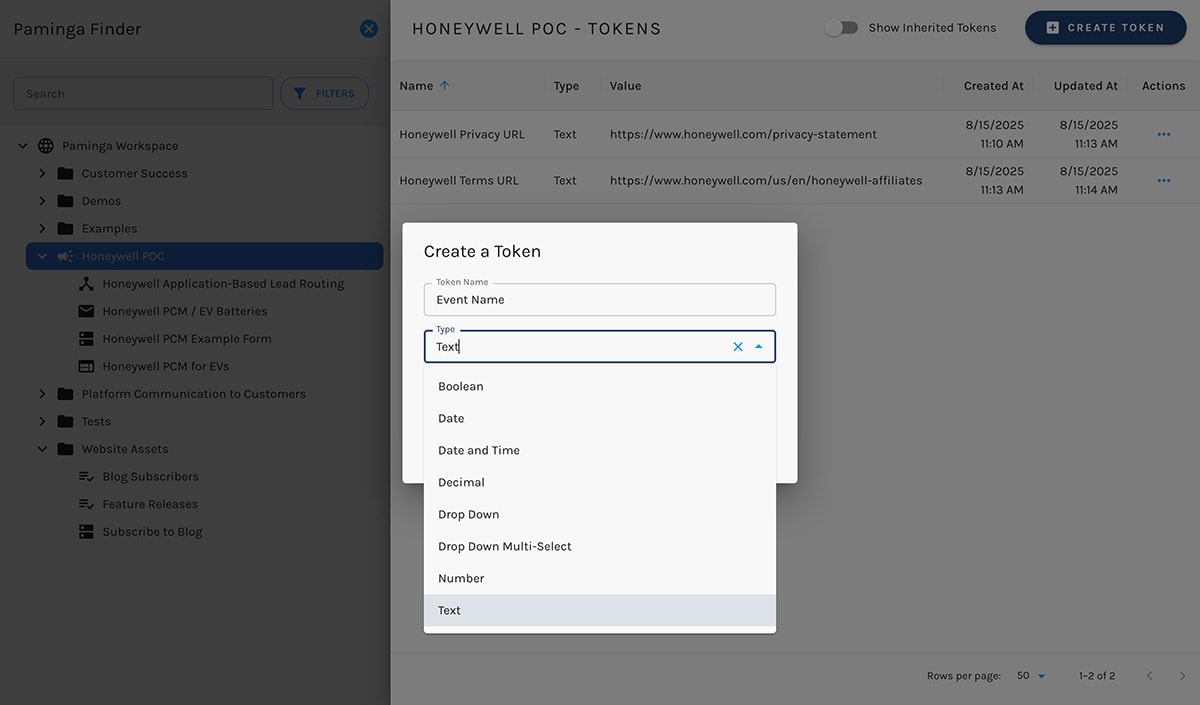
Clone the Folder, Change Token Values
Using an Event as an example:
- You've created tokens for event name, registration URL, date & time, location, etc. on the folder containing your event's assets
- You've used those tokens on the landing pages, forms, in "thanks for registering" emails, event reminder emails, "thanks for attending" email...
- Clone that folder for your next event. All of your assets are cloned. Only the name of the cloned folder is new
- Change the values for event name, registration URL, date & time, location, etc. for your new event
You're pretty much done!
Inherited Tokens
Tokens can be "inherited" from any parent folder.
If your marketing asset is four folders deep, you can personalize with token values from any those parent folders.
Right Click Convenience
Right click to create a new folder. Or new sub-folders. Organize as you like.
Right click on that folder to create new marketing assets:
- Calls to Action (CTAs)
- Emails (using the all-new Email Builder in beta now!)
- Events
- Forms
- Landing Pages (new builder launching in September!)
- Marketing Lists
- Global Segments
- Subscription Lists
- Automations
- Abandoned Cart
- Product Recommendations
- Sunset Contacts
- Workflows – And soon: Drip Series, quick email blasts, and more!
Right click to clone any individual asset. Or to clone an entire folder.
Double click to open/edit any asset 👍


