New: Next-Gen Workflow Builder

The new Workflow Builder is the most flexible automation surface we've ever shipped — branching, splits, merges, A/B email tests, goals, and an infinite Canvas you can actually think on.
This is the piece I've been waiting to ship.
We rebuilt Workflows from the ground up. "Classic Workflows" still works exactly as it always has — your existing automations keep running — but every new motion you build going forward should live here.
Paminga's Workflow Builder
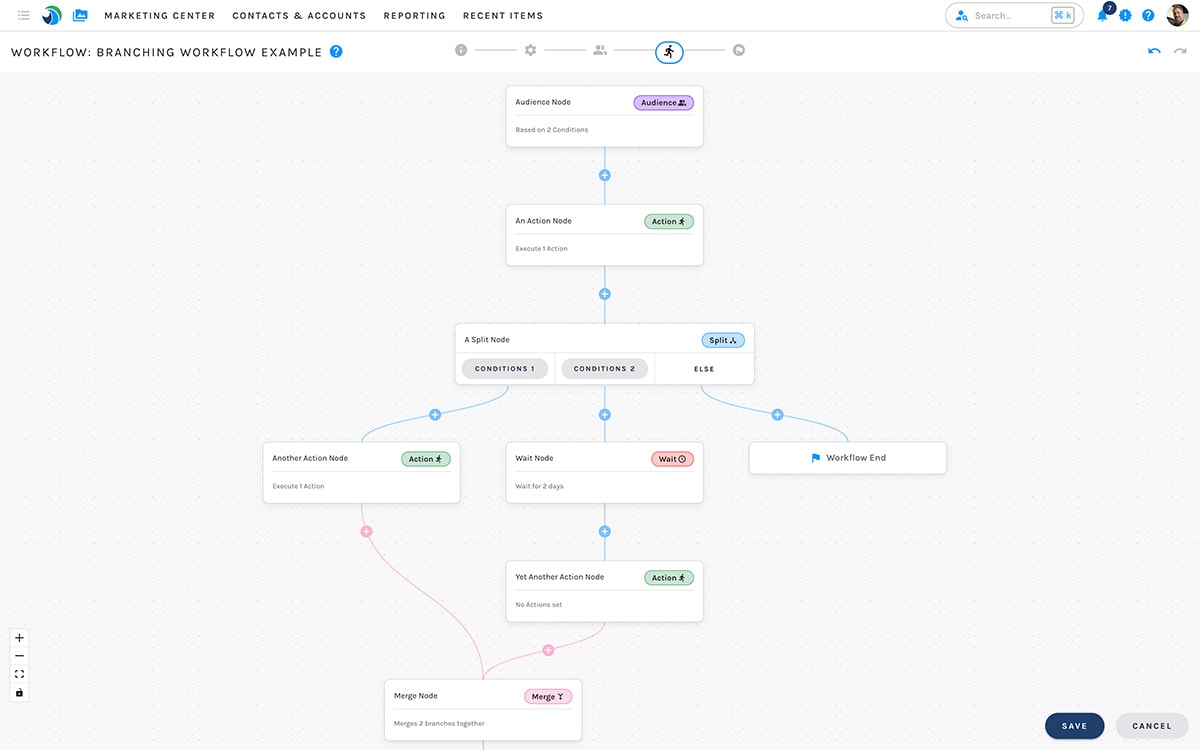
Build on an Infinite Canvas
The Canvas is exactly what it sounds like — limitless. Workflows can branch and branch again. Branches can be merged back together. There's no node cap and no layout cage.
Trackpad? Pinch to zoom, just like a photo on your phone. Mouse works the same — just without the pinching.
The Node Types You Actually Need
Every node type was designed to do one thing well.
- Audience — the node every Workflow starts with. Edit your audience directly on the Canvas or from the dedicated Audience step (Simple list membership, Advanced demographic/firmographic/behavioral conditions, or a Global Segment).
- Action — fire any of Paminga's Actions. Enable as many as you want in a single node. No race conditions — the contact doesn't move on until everything in the node is done.
- A/B Email Test — test up to 4 emails or variants in one node. Set a test size with a slider, pick the winner by opens or clicks. The A/B Test Merge node is added for you automatically.
- Wait — pause a contact for weeks, days, hours, or minutes. Mix and match.
- Split (Conditions) — branch on Segment Builder conditions. Operationally a
switch— mutually exclusive branches, with a configurable Else. - Split (Random Distribution) — slider-based random splits for A/B-style testing across full branches. Lock one split while you re-tune the others.
- Merge — combine separate branches back into one.
- Go To — jump to any node in the Workflow. Build controllable loops.
Goals — Pull Contacts Out When They've Converted
Workflows have first-class Goals.
When a contact meets a goal's conditions, two things happen:
- They're removed from the Workflow — they stop progressing through nodes.
- Any Actions you've configured on that goal fire — globally or conditionally.
That's it. No more contacts looping through a nurture two weeks after they've already booked a demo. Define the goal, point it at the right Actions, and let the Workflow self-clean.
A Few Details Worth Knowing
A handful of choices that make the builder feel right under your hands:
- No race conditions inside a node. If a node has a Set Field Values Action and a Send Email Action, the email waits for the field write to land.
- Splits are mutually exclusive. A contact goes down one branch — not three. The Else branch only fires after any time-based condition has fully elapsed (because logically, we can't know yet).
- A/B Email Test is built for thought, not theater. Pick winner by opens or clicks, set the post-deploy window, and let the node decide.
What Just Shipped
Recent enhancements that landed alongside the broader release:
- Clone a node directly below itself — duplicate without dragging
- Read node settings while in stats mode — no more flipping back to design just to remember what a node does
- Faster, more controllable A/B routing — processing speed up, edge cases down
Get Started
- Open Marketing Center → Automations → Workflows and create a new Workflow
- Set your Audience — Simple, Advanced, or a Global Segment
- Drop nodes on the Canvas — start with one Action and a Wait, expand from there
- Add Goals when you know what "done" looks like for a contact
Your existing Classic Workflows aren't going anywhere. But once you build your next one in here, you won't go back.
Read the Workflow Builder docs to dig in.


