Lead Pipeline Settings
Leads is in beta. It may not be turned on for your account yet. To request access, contact Paminga Support.
Every sales team runs its pipeline a little differently. The values your Leads use, from the stages they move through to the reasons they're lost, are yours to define in Settings › Pipeline Settings.
The Leads tab holds four lists: Stages, Types, Sources and Ratings. Contact Roles and Lost Reasons live on the Shared tab, because Leads share them with Opportunities.
Your ability to access account settings may depend on the permissions set up by your organization.
Every new account starts with a sensible set of values in each list. Rename, reorder, add to or delete them as you see fit.
Stages
Stages are the steps a Lead moves through. Each one also carries two settings that give it meaning:
- Closes the Lead. A Lead on this stage is no longer being worked. Its Closed field turns on.
- Converts the Lead to an Opportunity. Moving a Lead to this stage converts it. A converting stage must also close the Lead, so this box stays disabled until Closes the Lead is ticked, and unticking Closes the Lead clears it.
A stage that closes without converting is a lost stage. Moving a Lead there asks for a Lost Reason.
New accounts start with these stages:
| Stage | Closes | Converts |
|---|---|---|
| New | ||
| Working | ||
| Nurturing | ||
| Qualified | Yes | Yes |
| Disqualified | Yes |
The grid lists each stage with its Order, a check under Closes and Converts, and one checkbox column for each of your Lead Types. Tick or untick a box in a type's column to add the stage to that type or take it away; the change saves as you click.
Lead Stages:

Add or Edit a Stage
Click Create Stage, or Edit in a stage's row actions. In the drawer:
- Stage Name (required).
- Closes the Lead and Converts the Lead to an Opportunity, as above.
- Comes after places the stage in the pipeline: choose First in the pipeline or the stage it should follow.
- Used by Lead Types sets which types offer the stage. A new stage starts on every type.
Delete a Stage
Deleting a stage removes it from every Lead Type. Every Lead Type needs at least one stage, so Paminga won't let you delete a stage, or take it off a type, when it's that type's only stage.
Types
Lead Types let different kinds of pursuit follow different pipelines. A partner-sourced Lead might skip steps a cold inbound Lead needs, for example. Each type has its own set of stages, and a Lead can only be moved to stages its type uses.
New accounts start with a single type, Standard, that uses every stage.
The grid shows each type's Stages in pipeline order. Click Create Type, or Edit in a type's row actions, to set its Name and tick the Stages it uses. A type needs at least one stage. A new type starts with every stage ticked, so it's usable the moment you save it.
Deleting a type also removes its stage choices.
Sources
Sources record where a Lead came from, so you can see which channels feed your pipeline. New accounts start with Web, Referral, Event, Partner, Outbound and Other.
Click Create Source to add one, or use a row's actions to edit or delete it.
Ratings
Ratings give your team a quick read on how warm a Lead is. New accounts start with Hot, Warm and Cold.
Click Create Rating to add one, or use a row's actions to edit or delete it.
Contact Roles
A Contact Role describes the part someone plays in a pursuit, and you set one for each Contact on a Lead. Paminga keeps one Contact Roles list, shared by Leads, Opportunities and Buying Groups, on the Shared tab.
Each role says which of those it's offered on. In the grid, tick or untick the role's box in the Lead column to offer it on Leads or stop offering it; the change saves as you click. In the role's drawer, the same choice is the Available on checkboxes. A new role starts out available everywhere.
Contact Roles:
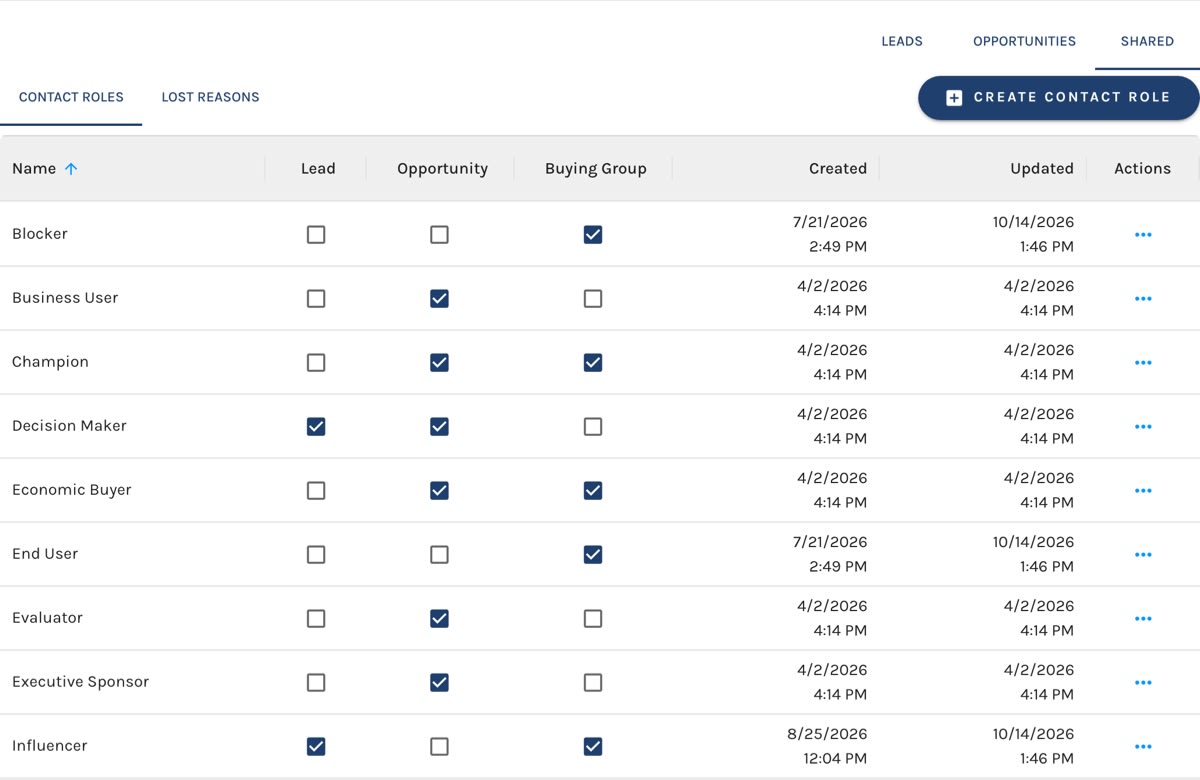
Because the list is shared, a role keeps its meaning when a Lead converts to an Opportunity: the Contact carries across with the same role.
New accounts offer these roles on Leads: Primary Contact, Influencer, Decision Maker and Other.
Lost Reasons
When a Lead closes without converting, its Lost Reason tells you why, and that's what turns a pile of dead Leads into something you can learn from. A Lead moved to a lost stage can't be saved without one.
Lost Reasons are one list shared by Leads and Opportunities, on the Shared tab. They work just like Contact Roles: tick a reason's box in the Lead column, or under Available on in its drawer, to offer it on Leads.
New accounts offer these reasons on Leads: No Budget, No Response, Not a Fit, Bad Timing, Duplicate and Other.
A Lead's picker offers the reasons available on Leads, plus whatever reason the Lead already holds, so a value never goes blank because you stopped offering it.


