Sequences
Sequences is in beta. It may not be turned on for your account yet. To request access, contact Paminga Support.
A Sequence is a rep's cadence: an ordered set of steps — phone calls, LinkedIn touches, and emails — worked one contact at a time, with the waits between steps counted in business days.
Marketing automation is built to send to many people at once. Outbound sales work is not. A rep calls, writes a note in their own words, sends a connection request, and waits to see who answers. Sequences give that work the same structure your marketing automations already have — without pretending a person isn't the one doing it.
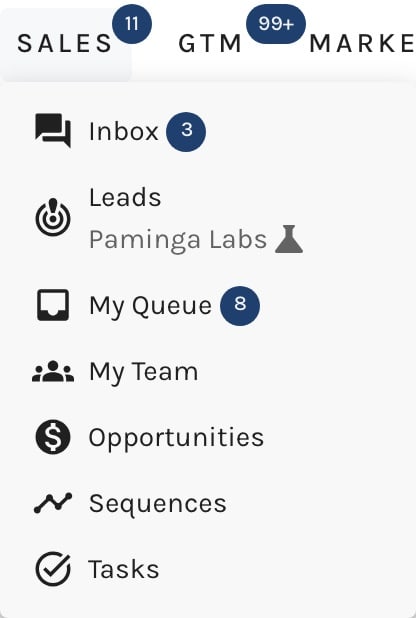
Everything a rep needs lives under the Sales menu:
| Menu item | What it's for |
|---|---|
| Sequences | Build and manage your cadences. See Build a Sequence. |
| My Queue | The rep's daily list of steps that are due, and Focus Mode for working through them. See My Queue and Focus Mode. |
| Inbox | Every conversation your sequence emails started, with replies classified for you. See Inbox. |
| My Team | Who is behind, and which sequences are working. See My Team. |
The Sales menu carries a badge counting your unread Inbox conversations plus the queue steps due now, so you know there is work waiting before you open anything.
The Sales Menu:
How a Sequence Works
- An author builds the sequence. Steps, the waits between them, the sending window, pacing, and goals. A sequence starts life as a draft and enrolls nobody until it is started.
- Contacts are added to it. A rep adds them from a contact record or the Contacts grid, or an automation adds them with the Add to Sequence action. Whoever adds them chooses who works the steps. See Add Contacts to a Sequence.
- Each step becomes work for the assigned rep. Manual steps land in that rep's My Queue and hold the contact there until the rep works the step, skips it, or ends the sequence for that contact. Automated steps send on their own.
- Replies are caught automatically. Emails sent from a rep's mailbox are watched for replies. A real reply ends the sequence for that contact; an out-of-office does not. See Inbox.
- The contact leaves. Either by reaching the end of the sequence, or by an exit: Replied, Meeting booked, Not interested, Wrong person, or a hard bounce. See Exits.
A contact can be in only one sequence at a time, and a contact being nurtured by a marketing automation can't be added to a sequence until they're out of it. Adding them can take them out of the nurture for you; see Add Contacts to a Sequence. That keeps a prospect from hearing from your marketing team and a rep in the same week.
Step Types
| Step type | Who does it | What happens |
|---|---|---|
| Manual Email | A rep | A Personally Authored email the rep reviews, personalizes, and sends from one of their mailboxes. |
| Automated Email | Paminga | Sends any published email automatically. No task is created. |
| Phone Call | A rep | The rep dials, reads from your call script, and logs the outcome. |
| LinkedIn Connection Request | A rep | The rep sends the request with your note (LinkedIn caps it at 300 characters). |
| LinkedIn Message | A rep | The rep sends your message in LinkedIn. |
Before You Start
Manual Email steps go out from real mailboxes, so reps need at least one before their first email step falls due. Connect them first — see Mailboxes.
Permissions
Sequences are governed by the Sequences permission (create, view, update, delete, and manage).
- Users with manage see and work with every sequence in the account, see every rep on My Team, can read any rep's Inbox conversations, and manage the account's mailboxes.
- Everyone else works with the sequences they created, and sees only their own row on My Team.
See Permissions for how to grant it through Roles and Teams.


