Inbox
The Sequences Inbox is in beta. It may not be turned on for your account yet. To request access, contact Paminga Support.
Every Manual Email step a rep sends starts or continues a conversation in one of their mailboxes. The Inbox brings those conversations together in one place, across all of a rep's mailboxes, and keeps them tied to the contact and the Sequence they came from.
Paminga checks each mailbox for replies on its own. You don't have to forward anything or keep a tab open.
Reading the Inbox
Go to Sales › Inbox. The Sales menu shows how many of your conversations are unread.
The rail on the left filters your conversations:
| Filter | Shows |
|---|---|
| Needs reply | Conversations where the contact wrote last, and a person wrote it. |
| Unread | Conversations with something you haven't read. |
| All | Every open conversation. |
| Auto-replies | Conversations whose latest message was an automatic reply. |
| Bounces | Conversations whose latest message was a bounce. |
| Archived | Conversations you've archived. |
Narrow the list to one Mailbox, or Search by contact or company.
The Inbox:
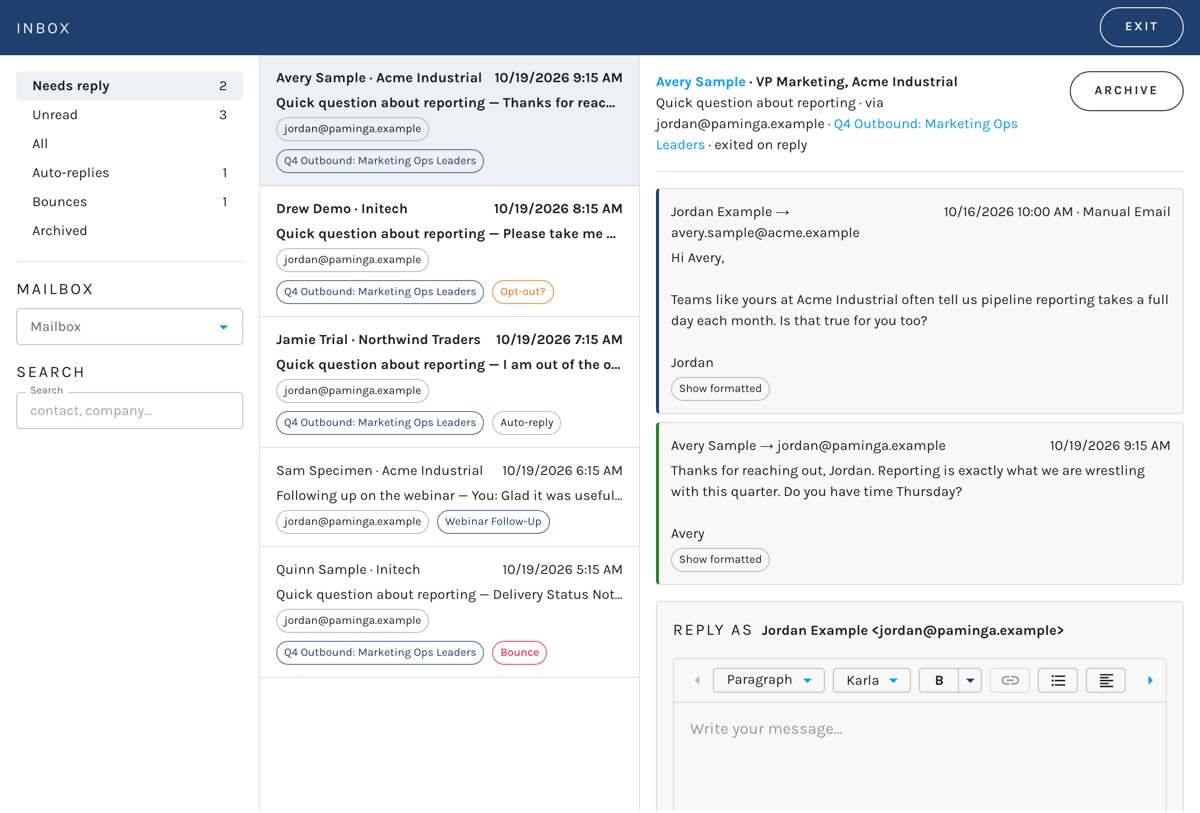
Each conversation in the list shows the contact, the subject and a preview of the latest message (You: when you sent it), the mailbox it lives on, the sequence it came from, and what the latest reply turned out to be.
How Replies Are Classified
Gmail threads an out-of-office and a delivery failure into the same conversation as the email they answer. Left alone, every one of them would look like the contact replied — and end their sequence. So Paminga reads each incoming message and decides what it is:
| Kind | What happens |
|---|---|
| Reply | A person wrote back. The contact exits the sequence as Replied, and their remaining steps are withdrawn. |
| Auto-reply | An out-of-office or other automatic message. The sequence carries on — the contact didn't do anything. |
| Bounce | A hard bounce marks the contact as bounced and ends their sequence. A soft bounce is recorded and changes nothing. |
| Opt-out? | A reply that looks like a request to stop. It's a reply, so the contact has already left the sequence. You decide whether to unsubscribe them. |
Opt-Outs
Paminga flags a possible opt-out but never unsubscribes anyone on its own — "please don't remove me" reads a lot like "remove me". The conversation shows Looks like an opt-out with two choices:
- Unsubscribe the contact. After you confirm, they're unsubscribed from all email, the change syncs to your CRM, and the conversation is archived.
- Not an opt-out clears the flag.
Replying
Open a conversation to read it; opening it marks it read. Messages show as text, and you can switch any message to its formatted version and back.
The reply box at the bottom shows which mailbox you're replying as, and continues the conversation — same thread, same subject. Write your reply in the same composer used for Personally Authored emails and click Send.
You can't reply to a contact who has unsubscribed, whose address has bounced, who has no email address, or who hasn't given GDPR consent that a sequence requires. Paminga tells you which.
Archive
Click Archive to clear a conversation out of the way. Archived conversations live under the Archived filter. Unarchive one to reply to it.
Other Reps' Conversations
The Inbox lists your own conversations. Users with the manage level of the Sequences permission can open any rep's conversation — from a contact's record, for example — and read it, mark it read, archive it, or settle an opt-out.
They can't reply to it. A reply goes out under the rep's name from the rep's mailbox, and only that rep can put their name to it.


