Buying Groups
Your ability to access account settings may depend on the permissions setup by your organization.
The roles you give members of your Buying Groups — the named subsets of an Account's Contacts that model who actually decides a deal — come from one shared list: the Contact Roles in Pipeline Settings.
The same list supplies the roles on Opportunity contacts. One list means "Champion" means the same thing on a Buying Group and on a deal, and your segments can rely on it — "every Economic Buyer across all your Buying Groups" only works if everyone maps deals with the same vocabulary.
Managing Buying Group Roles
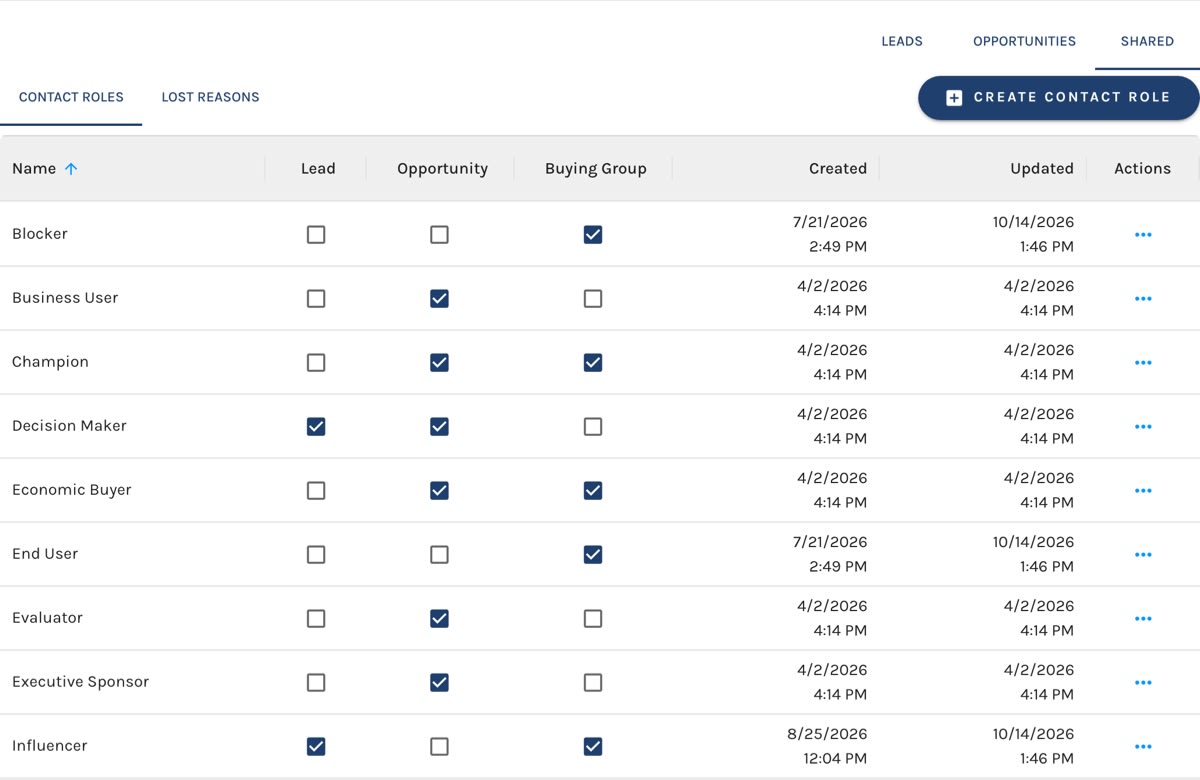
Go to Account Settings → Pipeline Settings, open the Shared tab, and choose Contact Roles.
Each role has a Buying Group checkbox column. A ticked box means the role is offered in Buying Group Role pickers. Click a checkbox to change it; it saves right away.
Contact Roles:
- Add a role — click Create Contact Role, give it a Name, and choose where it's Available on. A new role is offered everywhere by default.
- Rename a role — choose Edit from its row actions. Members store the role itself, not its name, so the new name shows everywhere the role is already used.
- Stop offering a role on Buying Groups — untick its Buying Group box. It's no longer offered in the Role pickers, but members who already hold it keep it, and it still shows by name.
- Delete a role — choose Delete from its row actions. It's removed from every picker, for Buying Groups and Opportunities alike.
Unticking beats deleting when a role is still in use. Unticking withdraws it from new picks without touching anyone who holds it, and it leaves the role available wherever else it's offered.
Default Roles
New Paminga accounts start with five roles offered on Buying Groups:
- Champion
- Economic Buyer
- End User
- Blocker
- Influencer
These are a starting point, not a fixed set. Shape them to match how your team actually maps deals.
If your account defined Buying Group Member Roles before Contact Roles existed, those roles were carried into the Contact Roles list and offered on Buying Groups.
Where Buying Group Roles Appear
- The Role picker when adding or editing members on an Account's Buying Groups tab
- The Role picker in the Segment Builder's Buying Group Membership condition, where "any Buying Group + a specific Role" turns your role taxonomy into targetable audiences


