CRM Panel/iFrames
Paminga's CRM packages can be used to embed Paminga data directly inside your CRM.
CRM iFrame
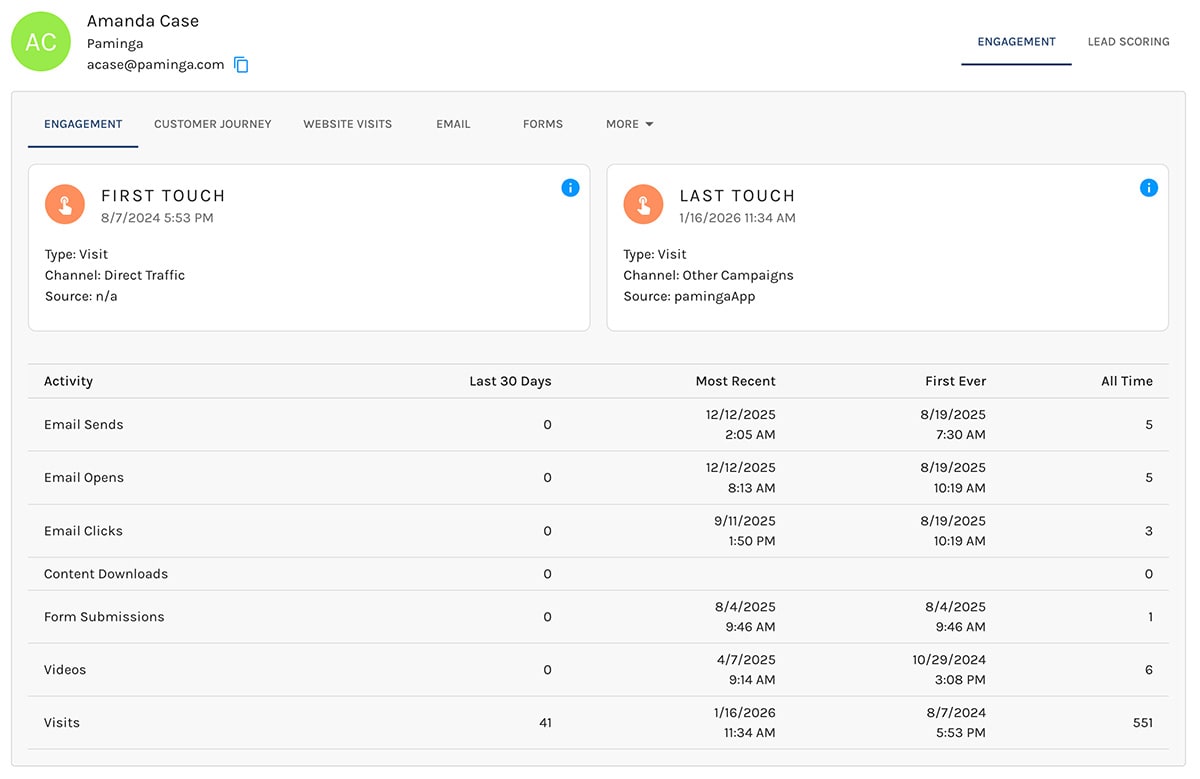
Managed Package
If you're using Salesforce, Dynamics, SugarCRM, or SuiteCRM, Paminga's iFrames can be added to Lead, Contact, and Account records as you choose.
The instructions for doing so are specific to each CRM.
Exposing Manually
You can load the Paminga panel into a web browser as you choose. You can:
- Embed via iFrame
- Expose a link that opens a new tab
Panel URL
The panel URL requires two GET variables to function:
- token (for authentication)
https://app.paminga.com/crm/panel/contact?email=email@domain.com&token=VALID_TOKEN_HERE
Authentication
The token parameter in the URL is where you have a choice to make:
Create One Token per Salesperson
Creating a distinct Personal Access Token for each sales person is the most secure way to go, but many teams see this as a bit of a hassle.
You have to create and store separate tokens per sales person, pass the correct token as a variable, and manage tokens as personnel changes are made.
Share One Token for All Salespersons
Less secure but more manageable is to create and share a single Personal Access Token across all sales personnel.
The best practice in this case would be to create a user specifically for panel/iFrame authentication and to set restrictive Permissions for that user.
Paminga does not charge you per user, so have no concern about costs.
You could also choose to use an OAuth token, but the net result is the same.


