Workflows
Workflows are Automations that can "branch" based on conditions of your choosing.
Workflows are the most flexible type of automation available in Paminga.
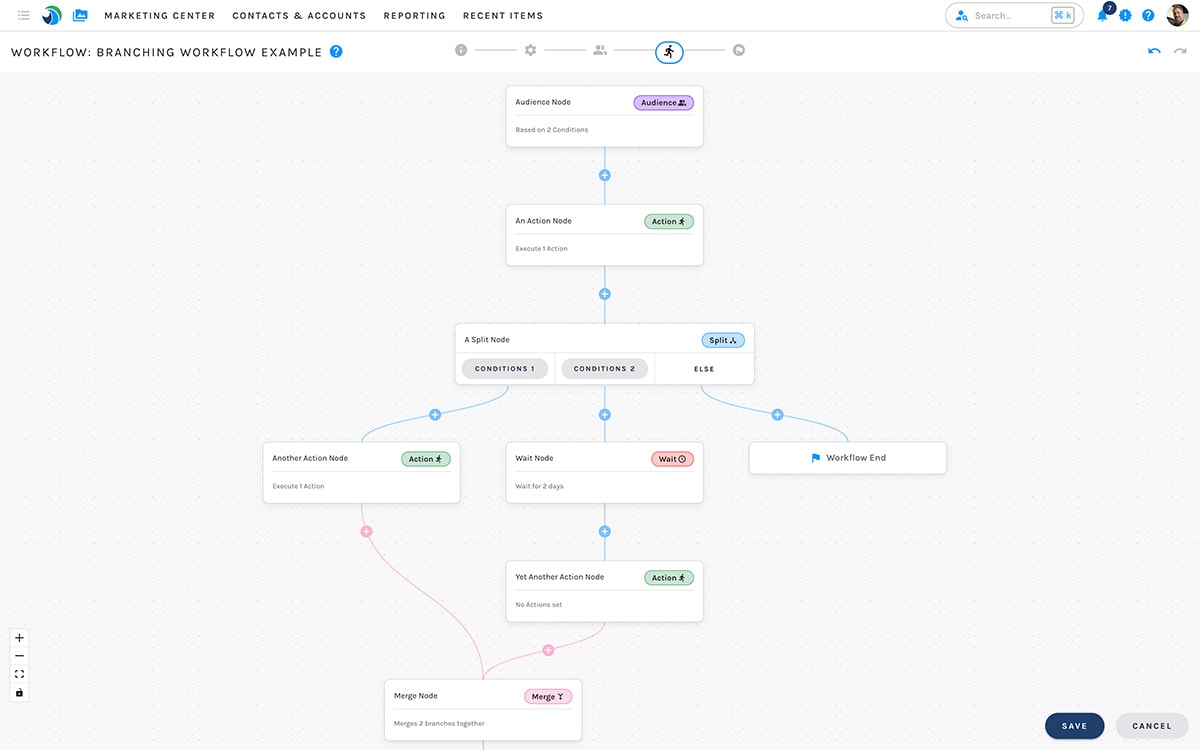
Paminga's Workflow Builder:
Steps
A workflow consists of 5 steps, one of which is an intro you'll likely skip in the future.
Workflow Builder Steps

- Intro: A short introduction to workflows with a checkbox that allows you to skip this step in the future
- Settings: Name your workflow, set its launch date, UTM tags, and other properties
- Audience: Define the audience for your workflow
- Simple: Create an audience based on list membership
- Advanced: Define your audience with any combination of demographics, firmographics, and behavioral attributes
- Global Segment: Use any of your existing Global Segments to control audience conditions
- Canvas: Build out your workflow with any number of nodes
- Goals: Optionally, add goals that remove participants from your workflow when conditions are met, and trigger additional actions as you choose
Execution
Contacts do not move on to the next node until all operations in the current node have completed.


