Ideal Customer Profiles (ICPs)
ICPs is in beta. It may not be turned on for your account yet. To request access, contact Paminga Support.
An ICP describes a type of company you sell to. Most businesses have more than one, and Paminga does not limit how many you define.
ICPs do real work once they exist. They classify your Accounts — one ICP per Brand — they're available to segmentation, they drive the Paminga IQ: ICP Classification Agent, and you can point any AI-generated email, landing page, form, or CTA at one so the copy is written for that audience.
You don't have to write them yourself. Point ICP Discovery at your website and it drafts them for you.
ICPs are part of Paminga IQ. The tab appears on Settings › Account › Brands once Paminga IQ is enabled for your instance.
Running ICP Discovery
Click Discover ICPs. The agent crawls your website and works out who you sell to from what you sell.
Your ICPs:
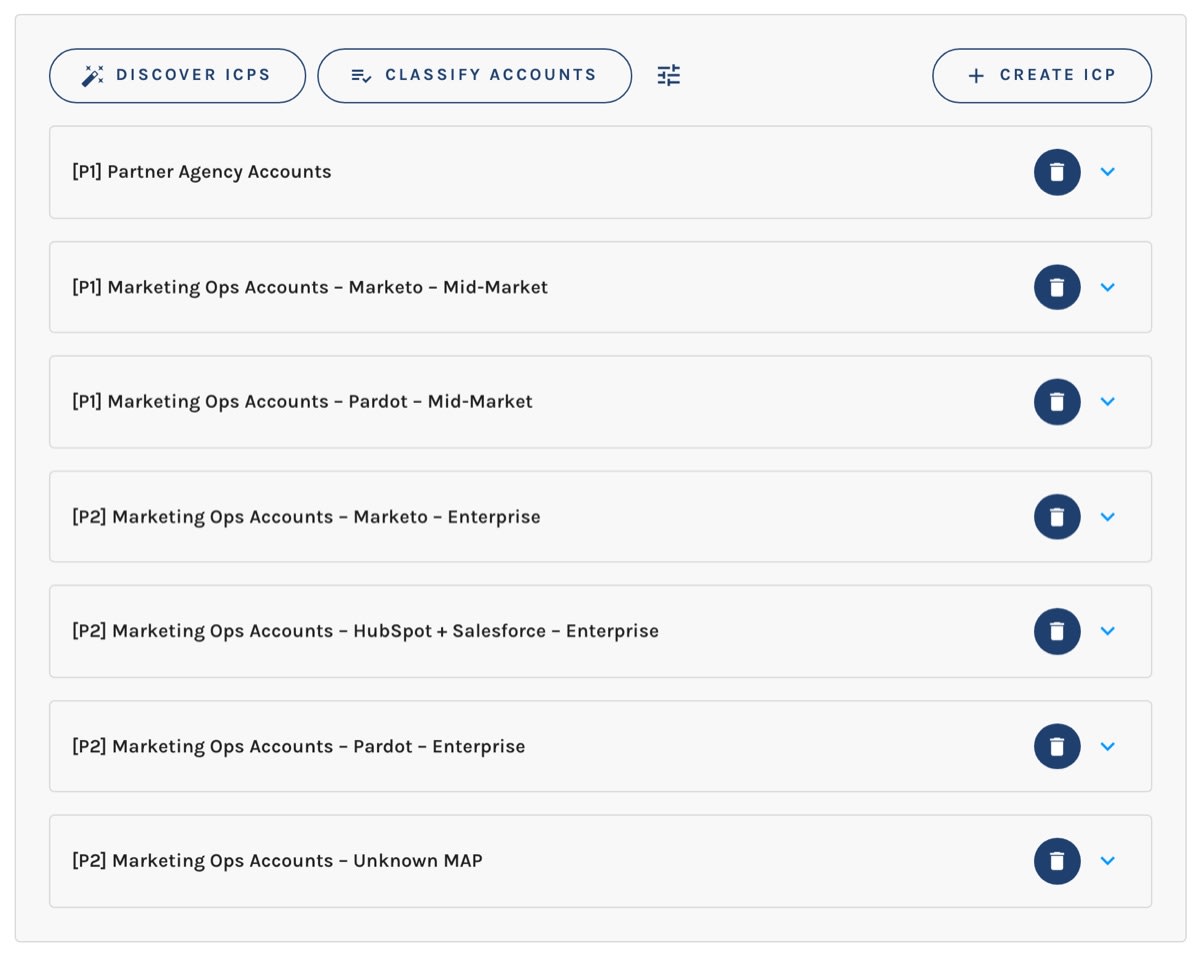
It crawls differently from the Brand Voice Agent, and much more deeply. Your brand voice is legible from almost any page on your site, but your audience map lives in your product, solution, industry, use-case, and case-study pages — so ICP Discovery weights exactly those and reads far more of them. A company with a dozen product lines gets an ICP set that reflects that, rather than one flattened summary.
You can optionally provide Additional context — free-form notes the agent should consider. Useful when a segment you care about is under-represented on your site.
The two discoveries are independent. Neither reads the other's output, neither blocks the other, and you can run both at once.
Re-Running Is Safe
Re-running ICP Discovery never deletes anything.
- An ICP whose name the agent recognizes is updated in place and keeps its identity, so every Account already classified as that ICP stays classified.
- An ICP the agent finds that you don't have yet is added.
- An ICP the agent doesn't mention this time is left alone.
Removing an ICP stays your decision, made deliberately.
What Each ICP Captures
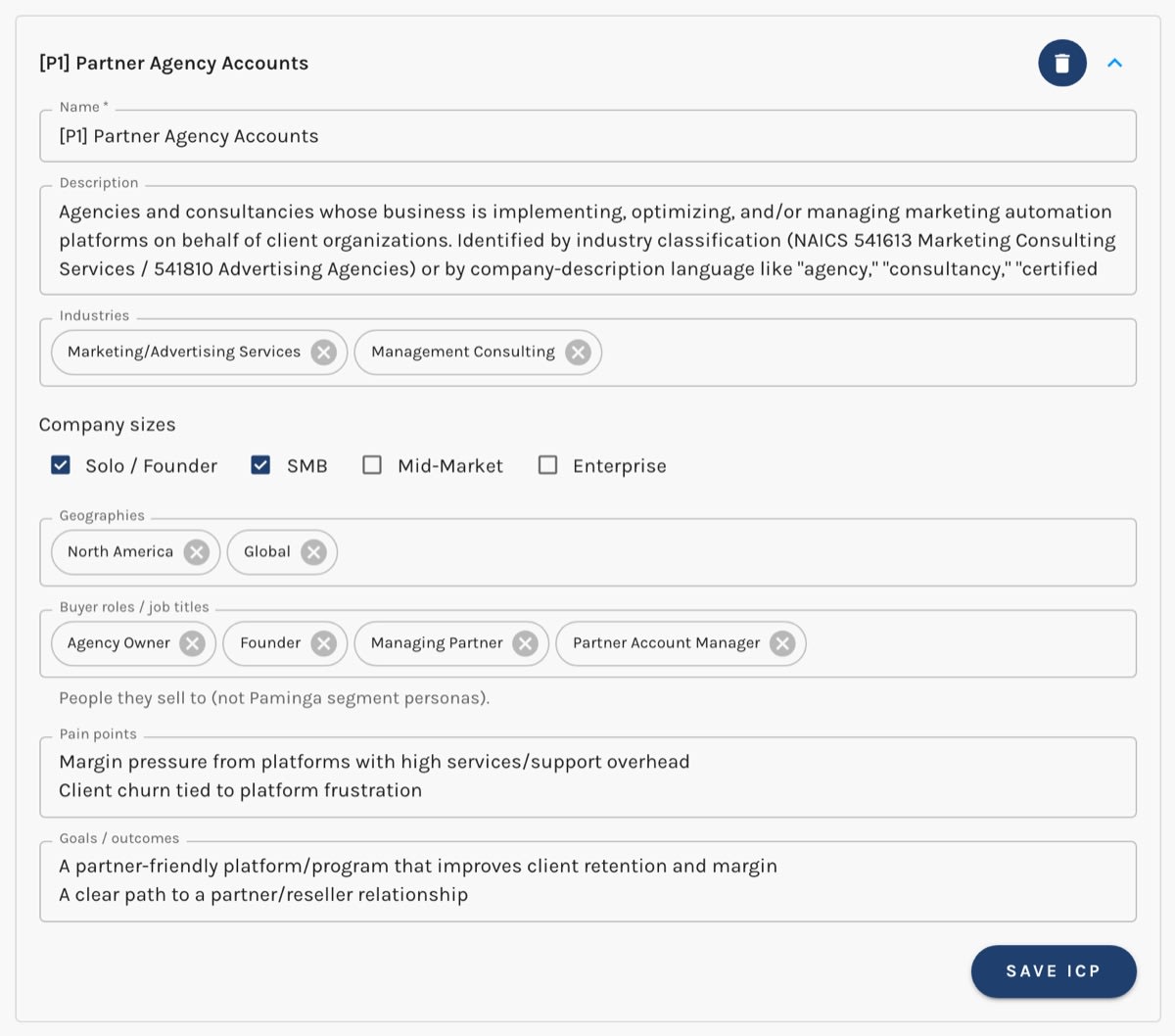
- Name — how the ICP appears everywhere it's used, including the ICPs section on each Account, segment conditions, and the audience picker in the AI builders. Make it self-explanatory; it's often read with no other context on screen.
- Description — who this ICP is, in a few sentences
- Industries
- Company Sizes — Solo / Founder, SMB, Mid-Market, Enterprise
- Geographies
- Buyer roles / job titles — the people this ICP's companies employ that you sell to (these are not Personas, which control content display)
- Pain points
- Goals / outcomes
Discovery proposes ICPs based on your website. You can also create them yourself with Create ICP, and edit any ICP — including the ones the agent drafted.
Editing an ICP:
Where Your ICPs Are Used
- ICPs on Accounts — every Account has an ICPs section listing its ICP for each Brand. Add one by hand, or let Paminga record it for you.
- Segmentation — the ICPs condition in the Segment Builder matches Accounts by ICP, for one Brand or for any, and those segments work anywhere the Segment Builder appears.
- The ICP Classification Agent — the Paminga IQ: ICP Classification Agent action reads each Account's website and records the Account's ICP for the Brand you choose — automatically, at scale.
- AI-generated content — when you build an email, landing page, form, or CTA with AI, you can pick an ICP as the audience and the copy is written for that buyer.
ICPs and Brands
Every ICP belongs to exactly one Brand. Every account has at least one Brand — yours was created with your account and named after it — so if you market a single brand, there is nothing to choose: your ICPs are that Brand's, and the ICPs tab never mentions Brands at all.
With two or more Brands, the ICPs tab of Settings › Account › Brands works the way the Brand Voice tab does: an Editing ICPs For selector at the top picks the Brand, and everything below it belongs to that Brand. Create ICP creates in the selected Brand, and the wand icon (Automatically Discover ICPs) crawls that Brand's own website and files what it finds under that Brand.
Choose which Brand's ICPs you're editing:

A consumer brand and a B2B brand under the same roof rarely share an audience map, and keeping each brand's ICPs with that brand means the wrong one never shows up as a plausible choice — not on an Account, not in the ICP Classification Agent, not when you point AI-generated copy at an audience.
An ICP's Brand is chosen when it's created and doesn't change afterwards. An ICP that belongs in another Brand is deleted and created again there. That's deliberate: Accounts are classified as an ICP for a Brand, so moving the ICP would leave those classifications pointing at a Brand the ICP no longer belongs to.
That works because an Account holds one ICP per Brand. The same company can be one ICP for your consumer brand and a different one for your B2B brand, and neither verdict overwrites the other. When you classify an Account for a Brand, whether by hand or with the ICP Classification Agent, the candidates are that Brand's ICPs. A classification means the same thing everywhere it's read — in a segment, in a report, or in an Action — because it always says which Brand it was recorded for.
Deleting an ICP
When you delete an ICP, every Account classified as that ICP loses that classification and becomes unclassified for that Brand, rather than left pointing at something that no longer exists. Segments built on that ICP will simply stop matching those Accounts.
Deleting a Brand
A Brand that still has ICPs can't be deleted. Delete its ICPs first — each one is a deliberate removal, with the consequences above — or archive the Brand instead, which keeps its ICPs and every Account classification intact. Deleting a Brand with no ICPs removes that Brand's row from every Account, while each Account's ICPs for your other Brands stay put.


