Publishing & Hosting
Unlike Paminga Forms and CTAs, which you embed into pages on your own website, landing pages are hosted by Paminga. There's no embed code — when you publish a landing page, it goes live on one of your landing page domains and is immediately reachable from anywhere on the internet.
Draft vs. Published
Every landing page has two states:
- Draft: Your in-progress changes. Drafts can be auto-saved as you work, and you can leave the builder and come back without losing anything. Drafts are not visible to the public.
- Published: The version that's currently live on the web. This is what visitors see when they hit your page's URL.
This separation means you can rework an existing landing page without affecting the version your prospects are visiting today. Your draft changes don't go live until you click Publish.
If you have unpublished changes, the Publish button will be enabled. If not, the button reads "Published" and is grayed out.
Publishing
When your changes are ready, click the "Publish" button. Paminga will:
- Validate the page (and refuse to publish if there are errors — for example, incomplete translations)
- Deploy the published version to Paminga's hosting infrastructure
- Make the new version immediately available at your page's public URL
There's no manual cache-busting step. The next visitor to hit your page sees the new version.
A page needs an address — a Hosting Domain and a Path — before it can go live. How you give it one depends on whether your account uses Approvals:
- Without Approvals: the first time you click Publish on a page with no address, Paminga opens the "Where should we Publish this Landing Page?" dialog and has you pick a Hosting Domain and a Path before anything goes live.
- With Approvals: Publish doesn't ask for an address. Set the Hosting Domain and Path in Settings first, and Publish opens the same dialog to confirm them before the page goes live. Publish a page with no address and its content is marked published, but nothing is on the web until you set an address in Settings and click "Publish to this address".
Once a page is live, Publish goes straight through, unless you've changed its address (see Changing a Published Page's Address).
Choosing Where a Landing Page Is Published:
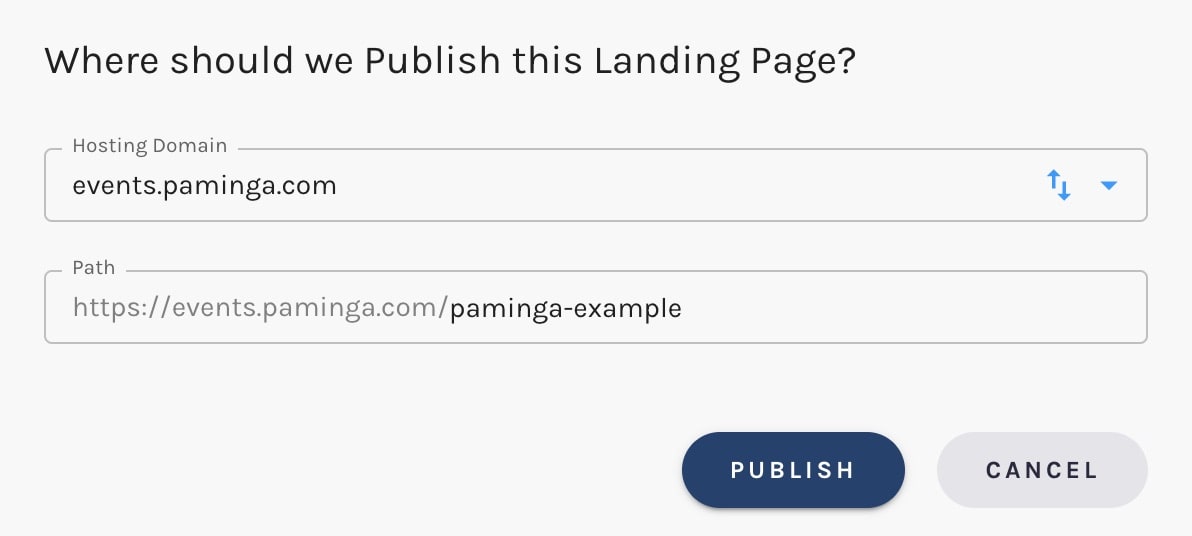
Your Page's Public URL
Your published landing page lives at:
https://{hosting-domain}/{path}
For a page with a path of "spring-webinar-2026" published on events.paminga.com, that's:
https://events.paminga.com/spring-webinar-2026
The hosting domain and path are set in Page Settings.
Changing a Published Page's Address
You can move a published page to a different hosting domain, a different path, or both. Change the Hosting Domain or Path in the page's Settings panel.
The new address doesn't take effect when you save. Saving (including auto-save) never moves a live page — the page keeps serving at its current URL, and the Settings panel shows "This address takes effect when you publish it." along with a "Publish to this address" button. The move happens when you apply it:
- Without Approvals: a staged address counts as something to publish, so the Publish button is enabled even if you haven't touched the page's content. Click either Publish or "Publish to this address".
- With Approvals: the bottom button only reflects content changes. If the address is the only thing you changed, it still reads "Published" and is grayed out, so click "Publish to this address" in Settings. If you also have content changes, clicking Publish applies the move first, then publishes the content.
Either route opens the publish dialog, which tells you "This page is moving to a new address." and asks what should happen at the current one:
- Redirect visitors to the new address (recommended) — the default. Paminga leaves a redirect at the old URL, so links in emails you've already sent, ads, social posts, bookmarks, and third-party sites keep landing on the page. Query strings and anchors carry over, so your UTM parameters survive the hop. The old URL tells search engines to index the new one instead.
- Remove the old page — the old URL is taken down. Anyone following an existing link gets "Page Not Found."
Redirect is the right choice almost every time. Pick Remove when you actively want the old address dead — a campaign that's over, or a URL you'd rather nobody reached anymore.
Click Publish in the dialog to apply the move. If you started from the bottom Publish button with unpublished content changes, those publish to the new address in the same step. Close the dialog (or click Cancel) and nothing moves; the new address stays staged in Settings until you publish it or change it back.
Moving a Published Page (Redirect Is Selected by Default):
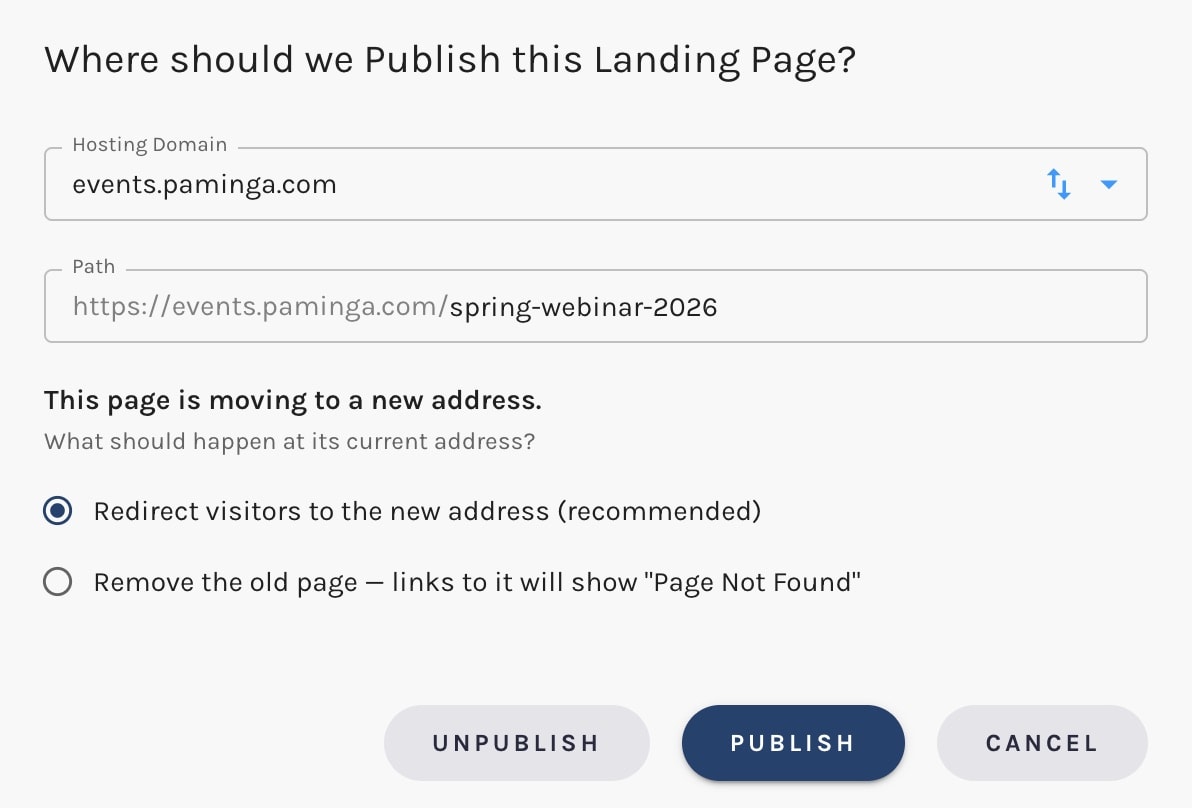
Changing a page's address takes the same permission as publishing it. Someone who can edit a page but not publish it sees the Hosting Domain and Path as read-only.
The Landing Page Name is only a label inside Paminga. Renaming a page doesn't change its URL — only the Hosting Domain and Path do.
SSL
Every page Paminga hosts is served over HTTPS. SSL certificates are issued and renewed automatically.
Tracking
Paminga's tracking beacon is automatically applied to every published landing page. You don't need to add it manually, and you don't need to add anything to Page Settings to enable it.
Visits, identified prospects, form submissions, and CTA interactions on the page all flow into Paminga the moment they happen.
Unpublishing
Unpublishing takes the page off the web. Its URL stops resolving and visitors get "Page Not Found." The page itself stays in Paminga with all its content, so you can put it back online whenever you like by giving it an address again, exactly as you would a new page (see Publishing).
There are two ways to unpublish:
- From the Landing Pages listing: open the row's actions and click the Unpublish icon ("Unpublish this Landing Page"). It takes effect immediately; there's no confirmation step.
- From the publish dialog: whenever the publish dialog opens for a page that's currently published, it includes an Unpublish button beside Cancel and Publish.
Unpublishing From the Landing Pages Listing:
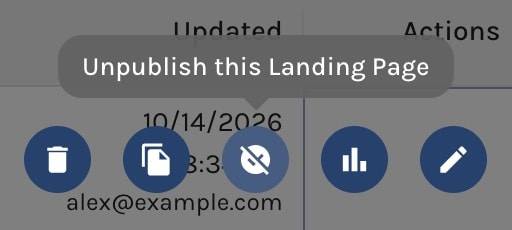
Unpublishing never leaves a redirect behind — there's nowhere to send visitors. If a page has been shared widely and its content is only changing address, don't unpublish it: move it with Redirect selected, and every existing link keeps working.


