Settings & SEO
Every landing page has a settings panel that controls everything outside of the page body — the URL, what search engines see, the favicon, and Custom Properties that are included with form submissions.
These settings are found in the left control panel rather than in the builder canvas, because they're properties of the published page rather than its content.
Settings
Landing Page Settings:
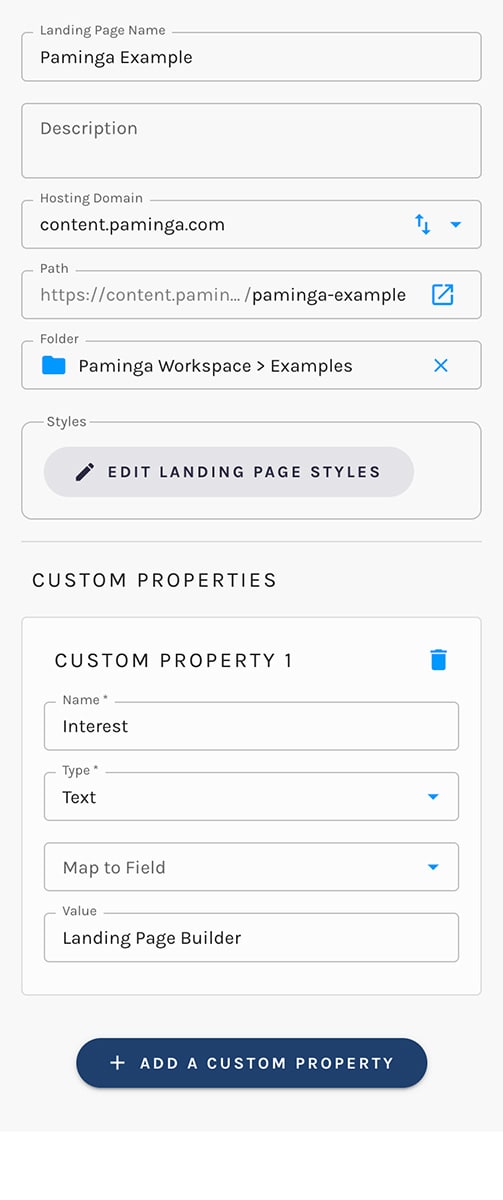
Hosting Domain
Choose which of your landing page domains this page should be published under.
All landing page domains are automatically secured with https://.
Path
The path lets you control the URL "slug" for the published page.
For example, a path of "spring-webinar-2026" with a hosting domain of "events.paminga.com" will result in your page being published at https://events.paminga.com/spring-webinar-2026 (when you choose to publish your page, that is).
Setting or changing the Hosting Domain and Path never puts a page online or moves it by itself — saving (including auto-save) leaves the address staged. Whenever the panel holds an address the page isn't published at yet, you'll see "This address takes effect when you publish it." and a "Publish to this address" button beneath the fields:
- On a page that has never been published, the notice appears as soon as you choose a Hosting Domain. "Publish to this address" opens the publish dialog with your address filled in.
- On a page that's already live, the page keeps serving at its current URL until you publish the new address.
For a live page, Paminga asks what should happen at the old URL — Redirect visitors to the new address (recommended), which keeps every link you've already shared working, or Remove the old page, which sends those links to "Page Not Found." See Changing a Published Page's Address for the details.
Changing the Hosting Domain or Path requires permission to publish the page. Renaming the page (its Landing Page Name) doesn't touch the URL at all.
A New Address Waits in Settings Until You Publish It:

Custom Properties
Custom Properties are a power move.
Add as many Custom Properties as you want to your landing page.
When a Paminga Form embedded on that page is submitted:
- Your custom properties are automatically submitted as hidden fields in your form submission
- You will see those custom properties in the Contact's Activity Stream and in a Form Submissions report
- If you've chosen to map your custom properties to a standard or custom field, that field will be filled with the value you've chosen
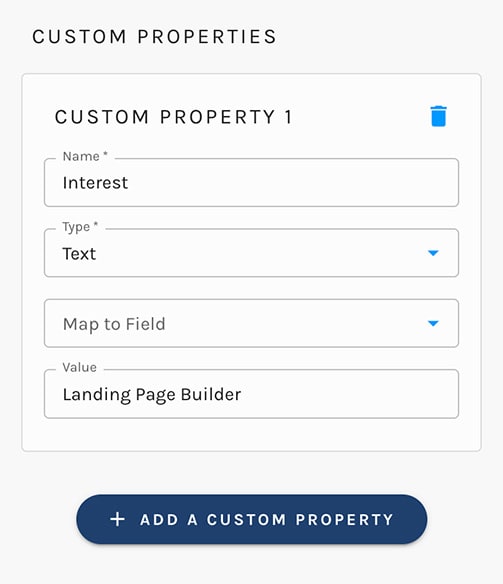
You can leverage Custom Properties to make any basic form incredibly versatile – reuse that form in dozens of places and always know the context, setting multiple properties along with the values input by your prospect.
SEO
Easily control meta title and description tags on your landing pages via the SEO tab.
Landing Page SEO:

Landing Page Title (Meta Title)
Sets the <title> tag on your published page. This is what shows in the browser tab and as the headline on search engine results pages.
If you leave it blank, Paminga falls back to the page name.
Meta Description
Sets the <meta name="description"> tag. Search engines often use this as the snippet under your title in search results, so write it for humans, not crawlers.
Favicon
Upload an icon to display in the browser tab next to your page title. If you don't set one, your account-level default favicon is used.
You don't need to add the Paminga tracking beacon. It's automatically applied to every landing page you publish.


