Download Center
Large exports and reports are built in the background, so you don't sit and wait for them. When one is ready, Paminga tells you with a notification. The Download Center is where that file lives afterwards: one place to pick up any file Paminga has built for your account, whether you dismissed the notification, weren't the one who ran it, or want it again a week later.
Find it under Reporting › Download Center.
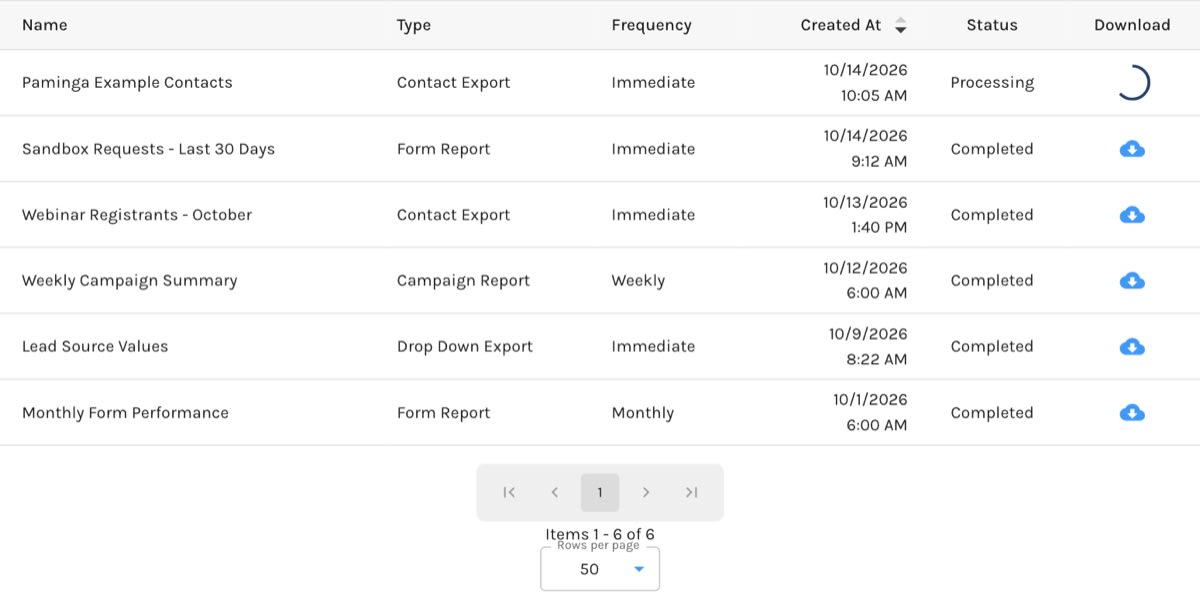
The Download Center:
What Lands Here
Every file Paminga builds in the background is listed here, including:
- Contact exports, including exports of a Marketing List.
- Form submission exports.
- Forms exports from your forms list.
- Drop Down exports.
- The Excel download from the Automation Performance Dashboard.
- Reports, including one-time (Immediate) reports. When you create an Immediate report, Paminga takes you straight here to wait for it.
The list is for your whole account, so a file a teammate exported shows up for you too.
What Each Row Shows
The newest file is at the top.
| Column | What it shows |
|---|---|
| Name | The file or report name you chose. |
| Type | What produced the file, such as Contact Export, Form Report, Campaign Report, or Drop Down Export. Form submission exports are listed as Form Report. |
| Frequency | Immediate for a one-time file such as an export, or Daily, Weekly, or Monthly for a Scheduled Report. |
| Created At | When the file was requested. |
| Status | Pending, Processing, Completed, or Failed. |
| Download | The download button. |
A Processing row turns into a download button when the file is ready. If a file still shows Processing, refresh the page.
Downloading a File
Click the download icon in the Download column.
Two other states are worth knowing:
- Download icon greyed out: the export finished but found nothing to include, so there's no file. Hover over it and you'll see "No results found". Check the conditions or date range you used.
- Warning icon ("This Report has failed to complete successfully") with a Status of Failed: the file failed to build. Run the export or report again; if it fails a second time, contact Paminga support. A row whose Status is still Pending shows the same icon until the file starts building, so check the Status column first.
How Long Files Are Kept
Files stay in the Download Center for 45 days, after which they drop off the list. If you need a file for longer, download it and store it yourself.


