Nothing Goes Live Until the Right People Say So.
Marketing moves fast. That does not mean it should move without oversight. Paminga's approval workflow gives your team a structured review process without burying anyone in unnecessary steps.
Submit, review, comment, approve, and publish from one native workflow with a record of every action.
Native Review
A review process built into the platform. Not bolted on.
In most MAPs, approval process means a Slack message, a shared spreadsheet, or a calendar invite with a PDF attached. It works until it does not, and when something goes out wrong, there is no record of who reviewed it or when.
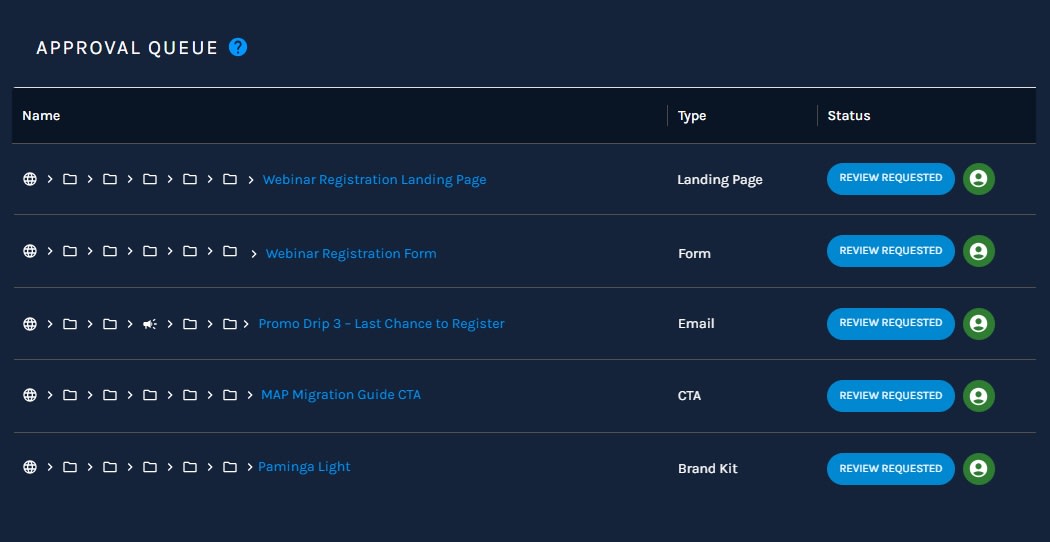
Paminga's approval workflow is native to the platform. Authors submit assets for review directly from the builder. Approvers review, comment, and approve or send back with feedback from a centralized queue. Nothing publishes until it has been approved. Every action leaves a record.
How It Works
Clear states for every asset.
Every asset starts in Draft. From there, it moves through a defined sequence of states, and everyone involved knows exactly where it stands.
Draft
The asset is being built. Only the author is in it.Review Requested
Approvers are notified immediately with a direct link.Changes Requested
The author can make updates without withdrawing the submission.Approved
An approver has signed off. The asset is ready to publish.Published
The asset is live, with review history preserved.Draft
The asset is being built. Only the author is in it.Review Requested
Approvers are notified immediately with a direct link.Changes Requested
The author can make updates without withdrawing the submission.Approved
An approver has signed off. The asset is ready to publish.Published
The asset is live, with review history preserved.Approver Authority
Two tiers of review control.
Instance-wide approvers
Review and approve assets across the entire Paminga instance, regardless of workspace. Ideal for brand stewards, legal reviewers, or senior marketing leadership.
Workspace-specific approvers
Add reviewers scoped to specific workspaces. They approve assets within their workspace, while instance-wide approvers always retain access alongside them.
Focused Review
Assign the right reviewer. Not just any reviewer.
When submitting an asset for review, authors can select specific approvers rather than notifying everyone eligible. Only assigned reviewers see the item in their queue and receive notifications, keeping review focused and inboxes clean.
Reviewer assignments can be adjusted after submission. Add or remove reviewers without pulling the asset back to Draft and starting over.
Brand
Assigned
Compliance
Assigned
Team
Not notified
Comments
Feedback stays with the asset.
Review feedback lives in a threaded comment thread attached directly to the asset, not in a separate email chain, a buried Slack thread, or a shared doc.
Approvers can combine a status change with a comment in a single action: request changes and explain why, in one step. An unread indicator tells you when something new has been added since you last looked.
Please swap the hero CTA before approval.
Approved after the footer language is updated.
Approval Queue
One queue. Full visibility.
Every asset waiting for review, currently in review, approved and pending publication, or recently published lives in one place with the information you need to act on it.
↻
Name
Type
Status
Assigned To
Requested
Recent Activity
Actions
Marketing Center › Invites ›
First Invite4:18 PM
○
Marketing Center › Reminders ›
Reminder 3 - Day Of4:28 PM
4:28 PM
○
Escape Valves
Governance without unnecessary friction.
Publish Without Approval
Designated users can bypass the review process when appropriate, while everyone else moves through the standard workflow.
Account-level control
Approvals can be enabled or disabled at the account level. Existing review history and comments are preserved, and assets in review return to Draft.
Brand Consistency at Scale
Protection that people will actually use.
An approval workflow only works if people actually use it, and people only use it if it does not slow them down more than it protects them. Paminga's review process is designed to be the path of least resistance for doing things right: submit, review, comment, approve, publish.
Clear states, real notifications, and one place to manage it all. The alternative is hoping everyone remembers to ask before they send.
Revision History
Every version. Always recoverable.
Every time an asset moves through the review process, Paminga captures a snapshot of it tied to its status, timestamp, and the user who made the change. That full revision history lives inside the asset, visible at any time.
People make mistakes. Approvals catch most of them. Revision history catches the rest, including the ones that make it through.
Preview
See exactly what the asset looked like at that point in time before deciding whether you need to act on it.
Revert
Restore a previous version as the current working state. If something went wrong between draft and publish, you are not starting over.
Clone
Promote any prior version into its own standalone asset when an older email or landing page is the right starting point for a new campaign.
Watch approvals work inside a live Paminga instance.
See how authors submit, approvers review, comments stay attached, and nothing goes live until it is ready.



Built with pride in Denver, Colorado, USA
Copyright © Paminga, Inc. 2026All rights reserved. Various trademarks held by their respective owners.