Your Product Is Talking. Paminga Listens.
Custom Events let you track specific actions users take on your website or in your product — and respond with Paminga automation the moment they happen. Not in batch. Not on a schedule. The moment it happens.
Watched a demo video. Clicked the pricing page. Activated a key feature. Hit a usage threshold. Every signal your product sends can now drive your marketing — natively, without a separate tool.
How It Works
Define it. Fire it. Paminga handles the rest.
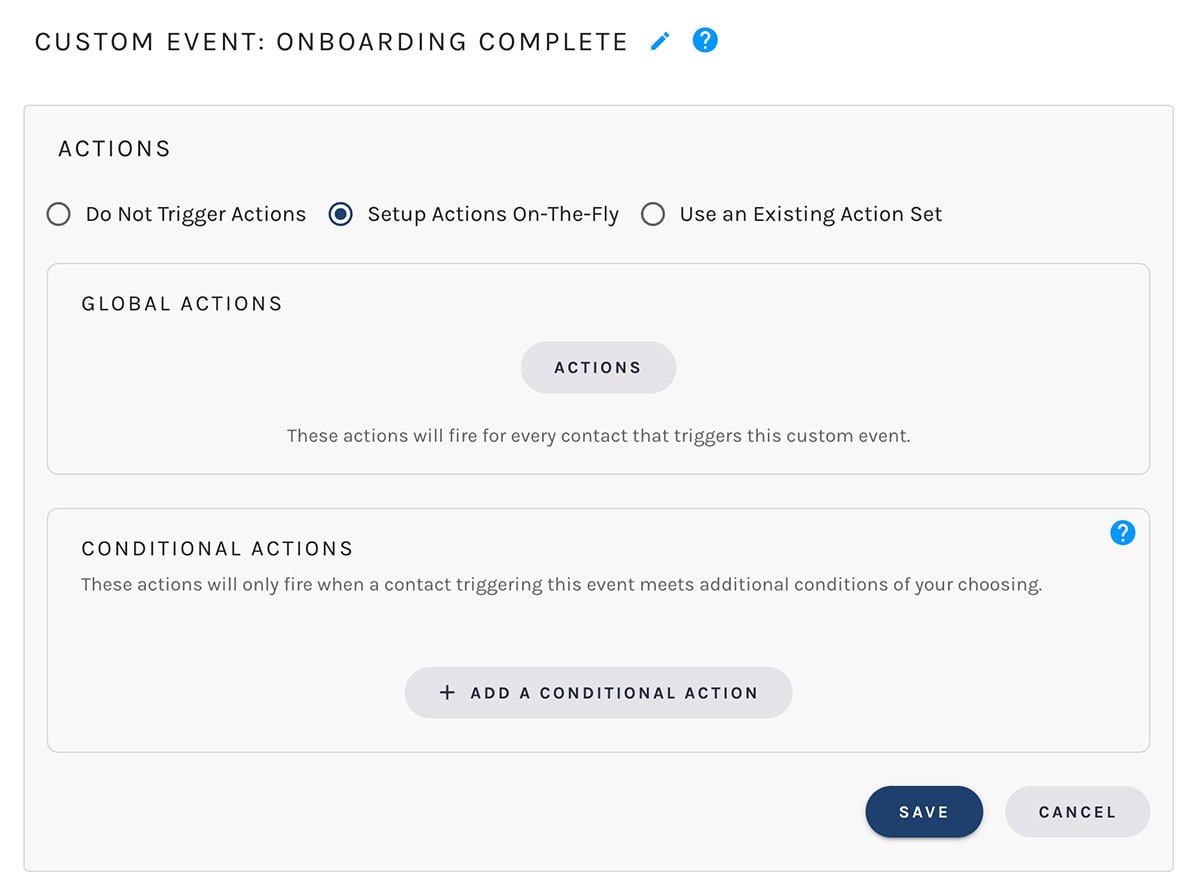
Custom Events are straightforward by design. You define the event in Paminga, fire it from your site or product with a single call, and Paminga identifies the contact, records the event, and executes whatever automation you've configured — immediately.
Define the Event
Name it, give it a slug, and decide if it counts as a conversion. Takes two minutes in Account Settings.Fire It from Your Product
One JavaScript call on your site, or a GraphQL API call from your backend. No contact data required on the client side.Paminga Identifies the Contact
Paminga matches the event to the contact automatically — no email required on the client side. It's already in the session.Automation Fires
Adjust lead scores. Trigger workflows. Update CRM records. Alert sales. Whatever you've configured, it runs immediately.Product-Led Growth, Natively Supported
Your product signals belong in your MAP.
PLG teams have always had a data problem: the signals that matter most — product usage, feature activation, in-app behavior — live in a different system from the marketing automation that's supposed to act on them. The workaround is always the same: export, import, sync, wait.
Custom Events eliminate that gap. When a user hits a usage threshold, activates a key feature, or reaches a moment that signals they're ready for a conversation — Paminga knows, and it acts. No export. No delay. No separate PLG tool.
From product signal to sales conversation. Automatically.
A trial user activates a high-value feature. Paminga fires a Custom Event. Their lead score jumps. A workflow enrolls them in an upgrade sequence. Sales gets an alert. All of it in sequence, all of it immediate, all of it configured once.
That's what it looks like when your product and your marketing automation are actually talking to each other — without middleware, without a Zap, without a data team.
What You Can Track
Any action. Any context. Any system.
If it happens on your website or in your product, you can track it. Here are examples of the kinds of events MOps and PLG teams configure in Paminga.
Fired when a visitor plays a product demo or overview video — with metadata capturing which video, how far they watched, and on which page.
High-intent signal fired when a known contact lands on the pricing page — triggers lead score increase and can alert the assigned sales rep.
Fired server-side via the API when a contact completes trial registration. Creates or updates the CRM record, enrolls them in onboarding, and kicks off the scoring model.
Fired from the product backend when a trial user completes a meaningful activation step — first workflow built, first campaign sent, first integration connected.
Fired when a user crosses a usage limit that signals upgrade readiness. Triggers upgrade nurture enrollment and optionally alerts the account owner.
Fired when a visitor downloads a gated content asset — with metadata capturing which asset, allowing segment-level reporting on content-driven pipeline.
Custom Events accept arbitrary metadata. Pass in the video title, the feature name, the plan tier, the page URL — whatever context is useful. It's stored alongside the event in Paminga and accessible in reporting. Use it to build precision segments and smarter scoring rules.
What You Can Do With Them
Events are the trigger. Everything else follows.
Custom Events aren't just for recording what happened. Every event you define can drive automation — scoring, nurture, CRM updates, sales alerts, and more.
Turn product signals into pipeline.
When a trial user activates a key feature or hits a usage milestone, Paminga fires your Custom Event, adjusts their lead score, enrolls them in an upgrade sequence, and alerts sales — automatically, in that order, without a workflow team meeting to design it.
Score on what actually matters.
Behavioral lead scoring is only as good as the behaviors you can track. Custom Events bring product behavior, high-intent website actions, and content engagement into your scoring model — so your MQL threshold reflects real buying signals, not just email clicks.
Enroll contacts at exactly the right moment.
Stop guessing when a contact is ready for the next step. Use Custom Events to trigger Drip Series enrollment or Workflow entry at the moment a contact takes a specific action — not on a time delay, not on a date, on the action itself.
Know which touchpoints drive revenue.
Mark your most important events as conversions. Paminga attributes them to the most recent impression in the visitor's session — giving you a clear line between marketing touchpoints and the actions that actually move contacts forward.
Surface buying signals to the right rep, immediately.
A known contact visits your pricing page for the third time this week. A Custom Event fires. A workflow sends an immediate notification to the lead owner with context — which page, how many times, what else they've done recently. Sales has what they need before the session ends.
Keep your CRM current without manual updates.
Configure Custom Event actions to update CRM fields, create tasks, or move records through pipeline stages — automatically, the moment the event fires. Your CRM reflects product behavior in real time, not on a daily export schedule.
Two Ways to Fire
Client-side or server-side. Your architecture, your choice.
Custom Events work however your stack is built. Fire them from the browser with a single JavaScript call, or from your backend via the GraphQL API. Both paths write to the same Paminga event record and trigger the same automation.
From Your Website
Fire via Paminga's tracking beacon. One JavaScript call inside whatever handler triggers the action — a button click, a video play, a scroll event. Paminga identifies the visitor automatically from their session. No contact data required.
// Fire when a contact watches a product video
$__MA.captureEvent('watched-product-video', {
  metadata: {
    videoTitle: 'Platform Overview',
    percentWatched: 87,
  }
});
Via the GraphQL API
Fire server-side from integrations, mobile apps, or backend pipelines. Pass the contact's email address — Paminga creates the contact if they don't exist yet. Full UTM and attribution support included.
# Fire when a trial user activates a key feature
mutation {
  triggerCustomEvent(input: {
    slug: "activated-key-feature"
    email: "user@company.com"
    metadata: { feature: "Workflow Builder" }
  })
}
After the Event Fires
Everything that follows is yours to define.
Custom Events are the trigger. What Paminga does next is entirely up to your automation configuration — all from the same platform your team already uses for email, workflows, and CRM.
Adjust Lead Scores
Increase or decrease scores across any of your active scoring rulesets — immediately, based on what the event signals about buying intent.
Enroll in Workflows or Drip Series
Add contacts to any active workflow or nurture sequence the moment the event fires — no batch enrollment, no waiting for a sync cycle.
Update CRM Records
Create or update leads, contacts, accounts, and opportunities in Salesforce, Dynamics 365, IFS, SugarCRM, or SuiteCRM — automatically.
Alert Sales
Send an immediate notification to the lead owner on record — with context about what the contact did and what happened next in their automation.
Set Field Values
Update any field on the contact, lead, or account record — in Paminga and in your CRM — based on what the event tells you about where they are.
Trigger Webhooks & Zapier
Fire outbound webhooks or trigger Zapier Zaps to extend event-driven automation across any tool in your stack.
See It in Action
See how Custom Events connect your product signals to Paminga automation — in a live platform walkthrough.



Built with pride in Denver, Colorado, USA
Copyright © Paminga, Inc. 2026All rights reserved. Various trademarks held by their respective owners.