Subscription Management That Respects Your Contacts
...and Your Compliance Requirements.
Give contacts control over how they hear from you — by brand, by topic, by communication type, or any structure that fits your business. List-based, fully flexible, and two steps to set up.
How It Works
Two steps. That's it.
Subscription management in Paminga is built on subscription lists — and the structure of those lists is entirely your strategic decision. Organize by brand, by communication category, by product line, by region, or any combination. Paminga provides the infrastructure. You define what it means for your business.
Create your subscription lists
Define as many lists as your organization requires — organized however makes sense for your business. Product updates, marketing emails, event invitations, regional newsletters, brand-specific communications.
Add the element to your form
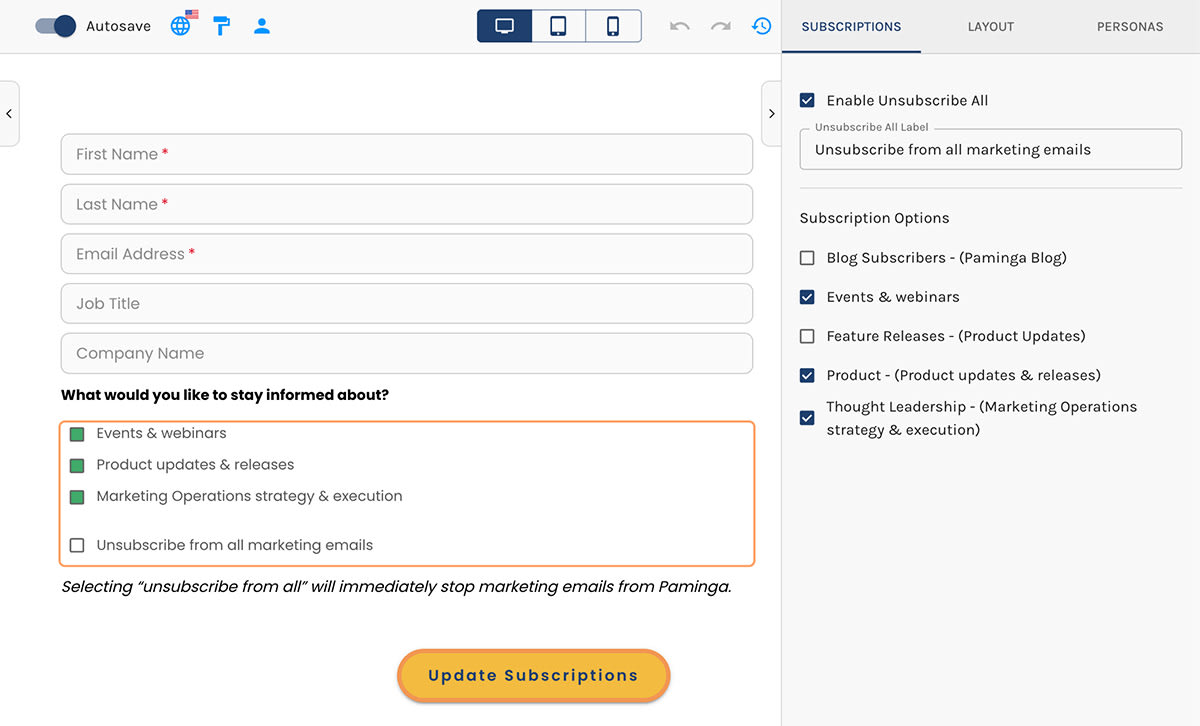
Add the subscription management element to any form and select which lists to surface. Paminga remembers each contact's existing preferences and displays them accurately. Changes process in real time — no batch jobs, no delays.
Communication Preferences
Manage how you hear from us. Changes take effect immediately.Built for Both Sides
What contacts can do. What MOps teams can do.
What Contacts Can Do
What MOps Teams Can Do
Total Subscribers
Every contact who has ever subscribed to this list — including those who have since opted out.
Mailable Size
Contacts currently subscribed and eligible to receive emails — the number that actually matters for campaign planning.
List-Level Actions
Trigger workflows, update fields, or sync to CRM automatically when contacts are added to or removed from a list.
Built for Compliance
GDPR. CCPA. No separate compliance tooling required.
Subscription lists are a natural fit for consent management requirements — without any specialized compliance tooling. Build your compliance workflow from the same tools your team already uses everywhere else in Paminga.
1
Create a subscription list for each consent type
One list per consent category you need to track — marketing communications, data processing, third-party sharing, or whatever your legal requirements define.2
Surface it only to contacts in the relevant jurisdiction
Use conditional display logic on your forms to show GDPR-specific consent fields only to contacts with a European country value. CCPA fields only to California contacts. No manual filtering required.3
Trigger an action set on opt-in
When a contact opts into a consent list, trigger an action set that records consent, captures the source URL and timestamp, and updates the relevant fields in your CRM — automatically.4
Audit trail maintained automatically
Every subscription change is recorded in the contact's activity stream. Transparent, auditable, and built from standard Paminga tools — no separate consent management platform, no parallel system to maintain.Simple by Design
Most MOps teams expect subscription and preference management to be one of the more complex configurations in their MAP. In Paminga it's two steps — create a list, add the element to a form. The simplicity isn't a limitation. It's a design decision.
See It in Action
See how Paminga's subscription management works — from list creation to preference center to compliance audit trail.



Built with pride in Denver, Colorado, USA
Copyright © Paminga, Inc. 2026All rights reserved. Various trademarks held by their respective owners.