Send Webhook
A webhook is a notification sent not to a human, but to a computer (a server).
These notifications contain data – for example, a form submission – much like an email you may receive notifying you that a form has been submitted.
Software developers on your end can write code to receive webhooks – and do things with these digital notifications on your end.
Paminga can send webhooks notifying your systems of various events that occur throughout the platform.
Send Webhooks Conditionally
You may choose to send webhooks conditionally by using Conditional Actions.
Conditional Actions are only triggered when conditions of your choosing are met.
Configuring Your Webhook
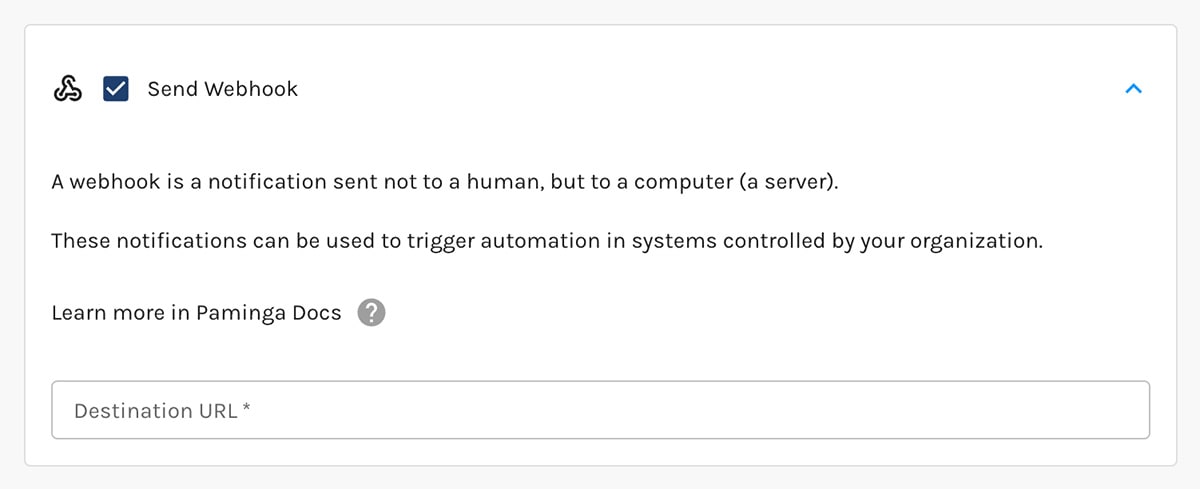
Simply enable your Send Webhook Action by checking the box.
Enter a valid URL to which you'd like the webhook to be sent. URLs must begin with https://.
Send Webhook Action
Validating Encryption/Security
Paminga verifies that the SSL certificate of your "destination URL" is valid. If it is not, Paminga will consider the webhook call failed.
Webhook Payload
Webhook payloads are sent via POST in JSON format.
The content of the webhook payload varies based on its source.
Verifying Received Webhooks
All webhooks sent by Paminga include a cryptographic signature to ensure authenticity and prevent tampering.
How It Works
Paminga signs every webhook request using HMAC SHA-256 and includes the signature in the X-Paminga-Signature header.
To verify a webhook:
- Extract the
X-Paminga-Signatureheader from the incoming request - Calculate the expected signature using HMAC SHA-256 on the raw JSON payload
- Compare your calculated signature with the received signature using a timing-safe comparison
Example Verification Code
PHP:
$signature = $_SERVER['HTTP_X_PAMINGA_SIGNATURE'];
$payload = file_get_contents('php://input');
$secret = 'your-shared-secret'; // Contact support to obtain

$expectedSignature = hash_hmac('sha256', $payload, $secret);

if (!hash_equals($expectedSignature, $signature)) {
    http_response_code(401);
    exit('Invalid signature');
}

// Process webhook...
Node.js:
const crypto = require('crypto');

const signature = req.headers['x-paminga-signature'];
const payload = JSON.stringify(req.body);
const secret = 'your-shared-secret'; // Contact support to obtain

const expectedSignature = crypto
    .createHmac('sha256', secret)
    .update(payload)
    .digest('hex');

// Use timing-safe comparison to prevent timing attacks
const signatureBuffer = Buffer.from(signature, 'utf8');
const expectedBuffer = Buffer.from(expectedSignature, 'utf8');

if (signatureBuffer.length !== expectedBuffer.length ||
    !crypto.timingSafeEqual(signatureBuffer, expectedBuffer)) {
    return res.status(401).send('Invalid signature');
}

// Process webhook...
Python:
import hmac
import hashlib

signature = request.headers.get('X-Paminga-Signature')
payload = request.get_data()
secret = b'your-shared-secret'  # Contact support to obtain

expected_signature = hmac.new(
    secret,
    payload,
    hashlib.sha256
).hexdigest()

if not hmac.compare_digest(expected_signature, signature):
    return 'Invalid signature', 401

# Process webhook...
Getting Your Shared Secret
Contact Paminga support to obtain your webhook shared secret. This secret should be kept confidential and stored securely (e.g., in environment variables, not in source code).
Automatic Retry
When the destination URL to which the webhook is sent fails to respond with a 2xx HTTP status code, Paminga will consider the call as failed. The call will also be considered failed if a response is not received within 3 seconds.
When a webhook call fails, we'll retry the call two more times using an exponential backoff strategy.


